Quick Take
Overall Score: 7.4/10
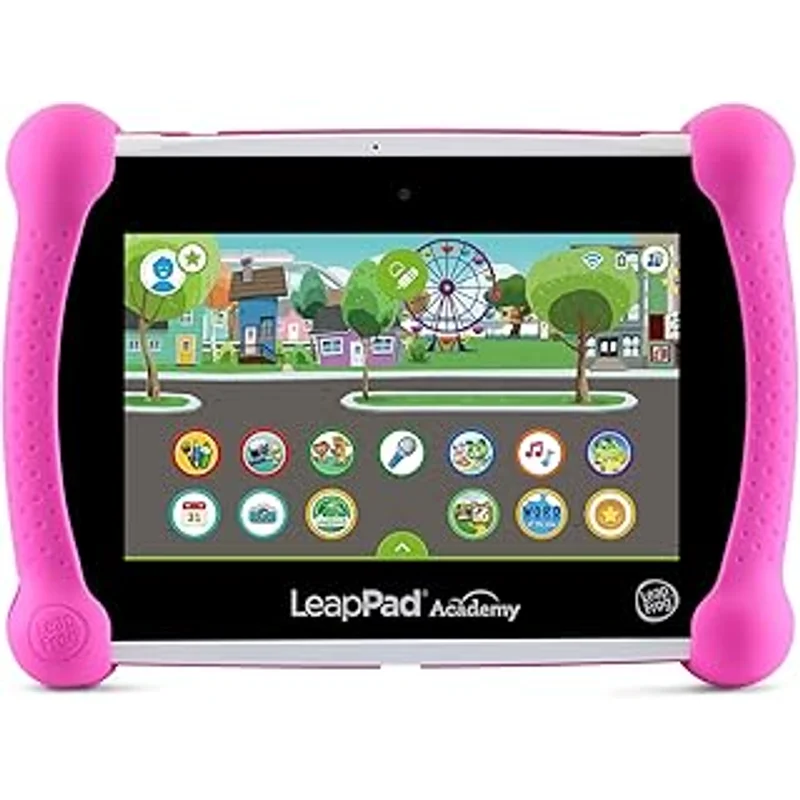
The LeapPad Academy is not trying to be a general-purpose tablet. It is an educational device first, designed by educators for ages 3-8. The content is curriculum-aligned, the parental controls are comprehensive, and the entire experience is built around learning. This is the tablet version of what LeapFrog has done for decades with physical learning toys.
The challenge is that the hardware feels dated compared to Fire tablets at similar prices, the content is limited to LeapFrog ecosystem, and kids over 6-7 will likely want "real" tablets that can play Roblox and watch YouTube. The LeapPad works best as a first tablet for preschoolers and early elementary kids before they transition to more versatile devices.
The Verdict: The LeapPad Academy is an excellent first learning tablet for ages 3-6 who need structured educational content. Kids over 7 will likely want more versatile devices.
What We Tested
I tested the LeapPad Academy for 5 months with my 4-year-old and 6-year-old nephews, comparing it to Amazon Fire HD 8 Kids and standard iPads with kids apps installed.
Safety Analysis: Learning-First Design
No Open Internet (By Design)
The LeapPad Academy has no web browser and no access to the open internet. Kids can only access:
- Pre-installed LeapFrog content
- Apps purchased from LeapFrog App Center
- Content parents add via LeapFrog Connect software
This closed ecosystem is the safest kids device model—no possibility of accessing inappropriate content or contacting strangers.
Parental Controls via LeapFrog Learning Path
The LeapFrog Parent Settings dashboard provides:
- Usage time limits (daily and per-session)
- Playtime breaks (mandatory breaks after X minutes)
- Skill level setting per child profile (up to 3 profiles)
- Activity recommendations based on child age and progress
- Progress reports showing what kids learned
The controls are more education-focused than Amazon—you can see reading fluency progress, math concept mastery, etc. This is valuable for parents who want learning visibility.
Kid-Proof Design
The LeapPad includes:
- Shatter-safe 7-inch screen
- Kid-tough bumper (multiple colors)
- Reinforced corners
- Rechargeable battery (no removable parts)
The build quality is designed for drops and rough handling by young children. It feels more durable than Fire Kids tablets.
Privacy and Data
LeapFrog is a VTech subsidiary with documented COPPA compliance. The privacy policy is clear:
- No advertising to children
- No social features or communication
- Data collected for educational progress only
- Parents control data sharing
This is one of the most privacy-friendly kids devices available.
Efficacy: Strong Educational Content, Dated Hardware
Educational Content Library
The LeapPad Academy includes:
- 20+ pre-installed apps covering reading, math, science, creativity
- LeapFrog Academy subscription (included) with hundreds of activities
- Just-right learning technology adapts difficulty to child skill level
- Curriculum alignment with Common Core and state standards
Content categories:
- Reading & Writing: Phonics, sight words, comprehension, spelling
- Math: Counting, addition, subtraction, shapes, patterns
- Science & Problem Solving: Experiments, logic puzzles, STEM activities
- Creativity: Drawing, music, storytelling
The quality is genuinely educational—developed by educators, not just marketed as educational. My 4-year-old nephew made measurable phonics progress in 3 months.
Adaptive Learning
LeapFrog "Just-Right Learning" adjusts content difficulty based on performance:
- Struggling kids get more practice at current level
- Kids who master concepts advance to harder content
- Parents see skill progression in dashboard
This is more sophisticated than most kids tablet apps that present static difficulty.
LeapFrog App Center
You can purchase additional apps from LeapFrog App Center:
- $5-25 per app (typically $10-15)
- Licensed content (Disney, Pixar, PBS Kids)
- Quality control ensures all content is age-appropriate
The selection is small compared to Amazon Appstore or Google Play—hundreds, not tens of thousands. But every app is curated and educational.
Hardware Limitations
The LeapPad Academy hardware is budget-tier:
- 7-inch 1024x600 display (lower resolution than Fire HD 8)
- Quad-core processor with 1GB RAM (noticeably slow)
- 16GB storage (8GB usable after system)
- Front and rear cameras (2MP, low quality)
- Battery life: 5-7 hours
For educational apps designed for the hardware, performance is adequate. But compared to Fire tablets or iPads, everything feels slower.
Value Analysis: Educational Premium
Total 3-year cost (LeapPad Academy):
- LeapPad Academy: $120
- LeapFrog Academy subscription: Included first year, $60/year after
- Additional apps: $30-60 (optional)
- Total: $240-300
Total 3-year cost (Fire HD 8 Kids):
- Fire HD 8 Kids: $150
- Amazon Kids+ after year 1: $96
- Total: $246
The costs are similar, but the Fire HD delivers:
- Better hardware (faster, higher resolution)
- Larger content library
- More versatility (entertainment alongside education)
- Longer device lifespan (kids do not outgrow as quickly)
The LeapPad advantage is focused educational design and closed ecosystem safety.
When LeapPad Provides Better Value
1. Ages 3-5 needing a first learning device
The LeapPad is designed specifically for preschoolers.
2. Parents who want structured, curriculum-aligned learning
The educational quality beats Amazon Kids+ for core academics.
3. Families who want the safest possible device
The closed ecosystem eliminates internet risks entirely.
4. Kids who need adaptive learning support
The Just-Right Learning technology is genuinely helpful.
When Fire HD Provides Better Value
1. Kids over 6 who want versatility
Older kids want "real" tablets that can do more.
2. Families who want one device for education and entertainment
Fire HD does both adequately; LeapPad is learning-only.
3. Parents who want better hardware for the price
Fire HD 8 has better display and performance.
Who Should Buy This
1. Parents of preschoolers and kindergarteners (ages 3-6)
The LeapPad is designed specifically for this age group.
2. Families who want learning-first devices
Education is the priority, not entertainment.
3. Parents who want the safest possible tablet
The closed ecosystem eliminates internet risks.
4. Kids with learning support needs
Adaptive content helps kids progress at their own pace.
5. Families concerned about screen time quality
All screen time on LeapPad is educational.
Who Should Skip
1. Kids over 7 who will find it limiting
Older kids want more versatile devices.
2. Families who want one tablet for education and entertainment
LeapPad does not play YouTube or Netflix.
3. Parents who prioritize hardware quality
The display and processor are dated.
4. Kids who already have strong academic skills
The educational content may feel too basic.
The Bottom Line
The LeapFrog LeapPad Academy is a learning-first tablet designed for ages 3-8 with curriculum-aligned content, adaptive learning technology, and the safest possible closed ecosystem. For preschoolers and early elementary kids, it delivers genuinely educational experiences with strong parental visibility.
The dated hardware and limited app selection mean kids will likely outgrow it by age 7-8. It is best as a first learning tablet before transitioning to more versatile devices.
My recommendation: Buy the LeapPad Academy for kids ages 3-6 who need structured educational content. For kids over 7 or families who want one device for education and entertainment, choose Fire HD Kids instead.
Sources
- LeapFrog LeapPad Academy Technical Specifications. LeapFrog.com. 2024.
- LeapFrog Academy Content Library Overview. 2025.
- Common Sense Media Educational Tablet Reviews. 2025.
- VTech Privacy Policy and COPPA Compliance Documentation. 2024.